
Cloudflare D1+R2 buckets for git but github.com FTW
Your app can have a Git history before you have a GitHub account. Ask Mainbrella’s Builder for an expense tracker, and we save the commits for you in Cloudflare D1 and R2. When you’re ready to put the app in your own repository, what happens to that earlier work?
We added an option in Projects to move those commits to a branch you choose and send Builder’s new commits there too, so you can stop paying us to store the history. We need your permission to write to the repository first, though. Our first dialog got that order wrong, asking for a URL before you’d granted us access. Comparing it with GitHub’s app installation screens helped us fix the sequence.
Keeping the repository after a build
Builder writes the expense tracker in a temporary Linux machine, installs its dependencies, and compiles it. We can shut that machine down when the work is done, but if you come back tomorrow and ask for CSV export, we need to load the files and history into another machine.
We run Git inside the machine, but keep the repository we use for saves outside the application directory. Application scripts can change their own .git, so we build each saved commit from files supplied by the Worker instead. That snapshot includes validated source, the dependency lockfile, our starter ignore rules, and generated images referenced in the source. It leaves out installed dependencies, compiled output, and environment files. The save code prepares the snapshot, and a helper in the machine runs Git.
R2 stores the files and Git history. We name source objects by their SHA-256 hash and keep them under the account and project’s prefix. A source manifest maps filenames to those objects, which lets us show the source without starting a machine. The Git bundles have their own paths under the same prefix:
build-git/<user>/<project>/
  objects/<sha256>       # source, assets, manifests, evidence
  parts/<sha256>         # chunks of native Git bundles
  bundles/<commit>.json  # bundle manifest
D1 records the saved versions and the current head. Each version points to a Git commit and its R2 bundle, along with the parent version, the Builder turn that saved it, and the result of our build check. A Mainbrella version ID identifies a turn; a Git commit ID identifies a Git object. The SHA-256 hashes in the storage paths identify the stored bytes. These are separate fields in the D1 schema.
The Worker uploads the R2 objects before it updates D1, checking the sizes and hashes of the bundle parts as it goes. It then saves the version and head in a D1 batch. A database trigger rejects the save if the Builder turn is no longer active or another save has changed the head. D1 runs those statements in a database transaction, but the R2 uploads are separate. We need the files in R2 before D1 tells anyone the new version is ready.
Saving each commit without copying the whole history
At first, we wrote a bundle of the entire history every time we saved a version. That meant uploading the same old commits with every edit. Now we save one initial bundle, then smaller bundles containing the objects added since the previous commit. A save that produces no new commit reuses the previous bundle.

A Git bundle contains Git objects and named references. Some bundles contain everything needed to clone a repository; others require earlier commits to be present. We record the required commit and the previous bundle’s manifest in each new manifest. Our helper creates an increment with the equivalent of this command, where PARENT_SHA is the previous saved commit:
git -c pack.window=0 -c pack.depth=0 \
    -c pack.allowPackReuse=false \
    bundle create --version=2 next.bundle main ^PARENT_SHA
We split each bundle into parts of at most 1 MiB, hash them with SHA-256, and list the parts in its manifest. To load the repository into a fresh machine, we follow the manifests back to the initial bundle, clone it, and fetch the increments in order. Git validates the objects, and our helper checks that the resulting head matches the commit we expected.
Those packing flags let the Worker assemble a download without starting a paid sandbox just to repack the repository. Restoring an older version can put the same object into a later pack with a different delta representation. Joining those packs as they are can leave conflicting delta references. We avoid that by storing whole objects in the increments. They still use zlib compression, but we give up delta packing.
The exporter can then join the object sections, write a pack header with the combined object count, and calculate a new SHA-1 checksum for the trailer. Git’s pack format describes those fields. This costs some compression efficiency, but the Worker can produce a complete bundle straight from storage. You can clone it and see the saved commits:
git clone -b main mainbrella-app.bundle expense-tracker
cd expense-tracker
git log --oneline
Asking for a repository URL too soon
Users could already download a bundle, clone it, and push it to GitHub themselves. We wanted them to be able to connect GitHub while they were still building the app. Our first dialog asked for owner/repository or a GitHub URL and filled in main as the branch.
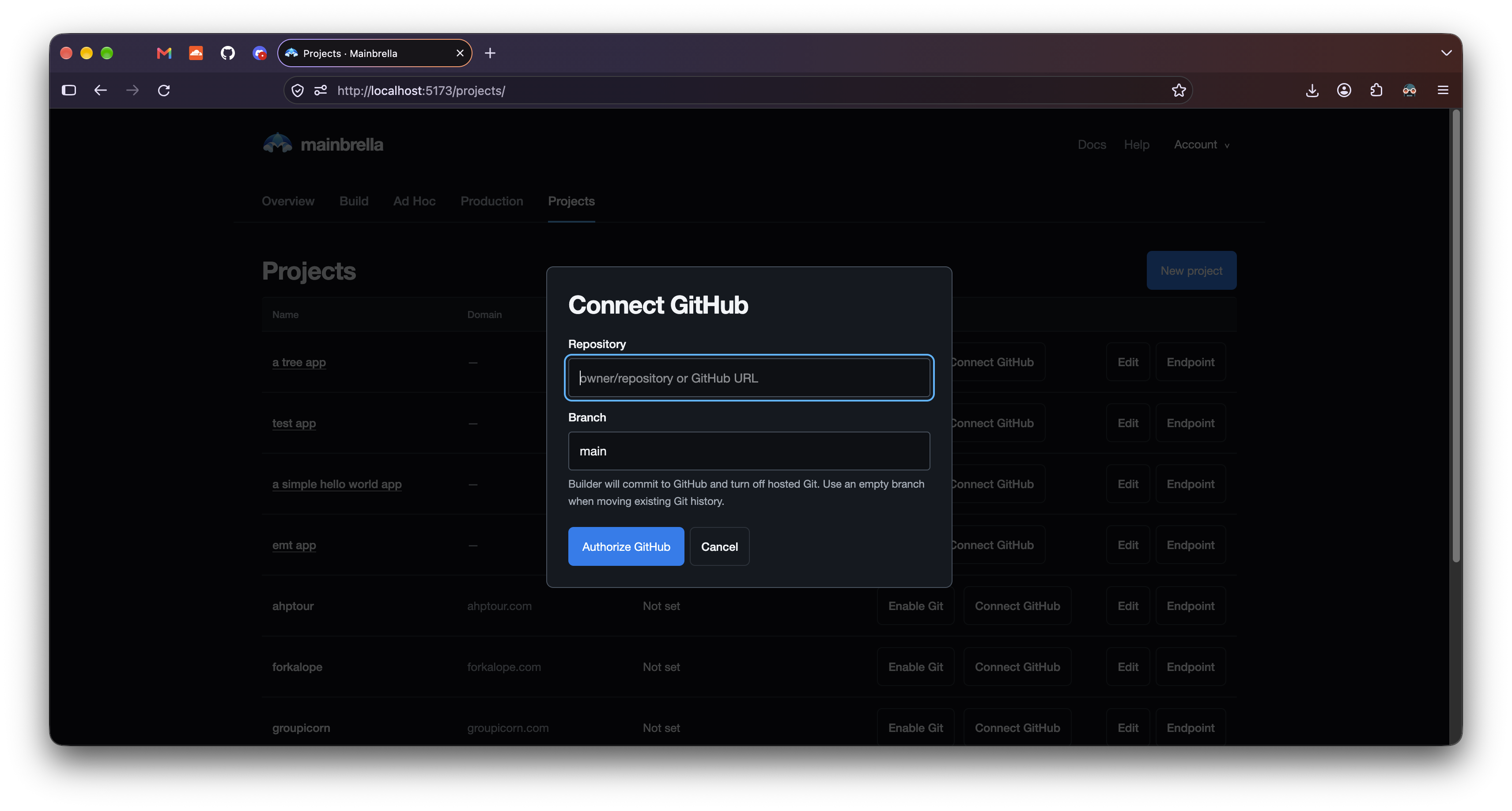
We had a connection form and backend code to move the history, but the form asked for the destination before the user had granted access. A URL doesn’t tell us which account should install the app, whether an organization allows it, or which repositories the user wants to share.
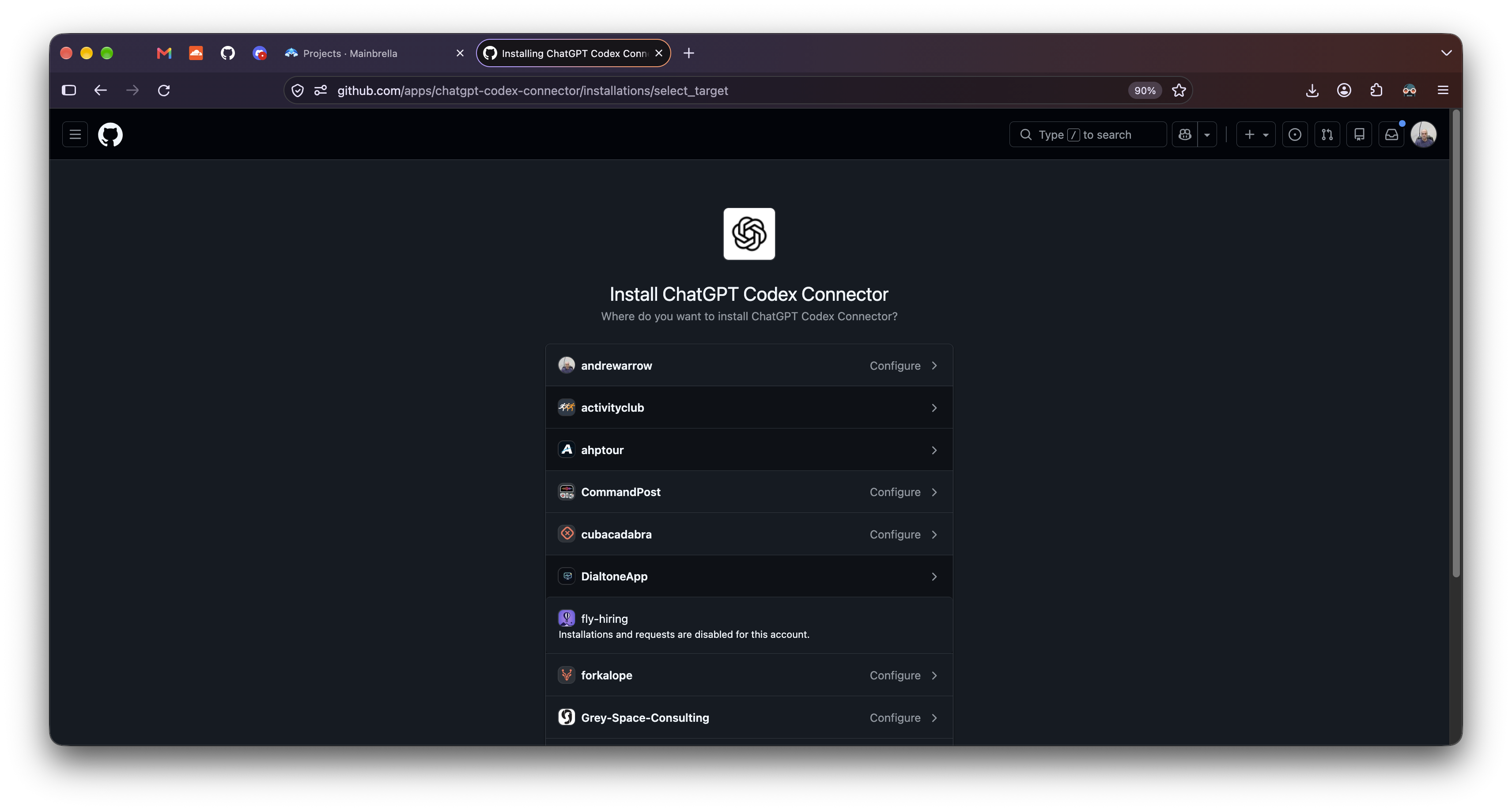
We compared our dialog with the ChatGPT Codex Connector installation screens on GitHub. The first screen lists my personal account and the organizations where I might install the app. I can choose an account there, or configure an existing installation.
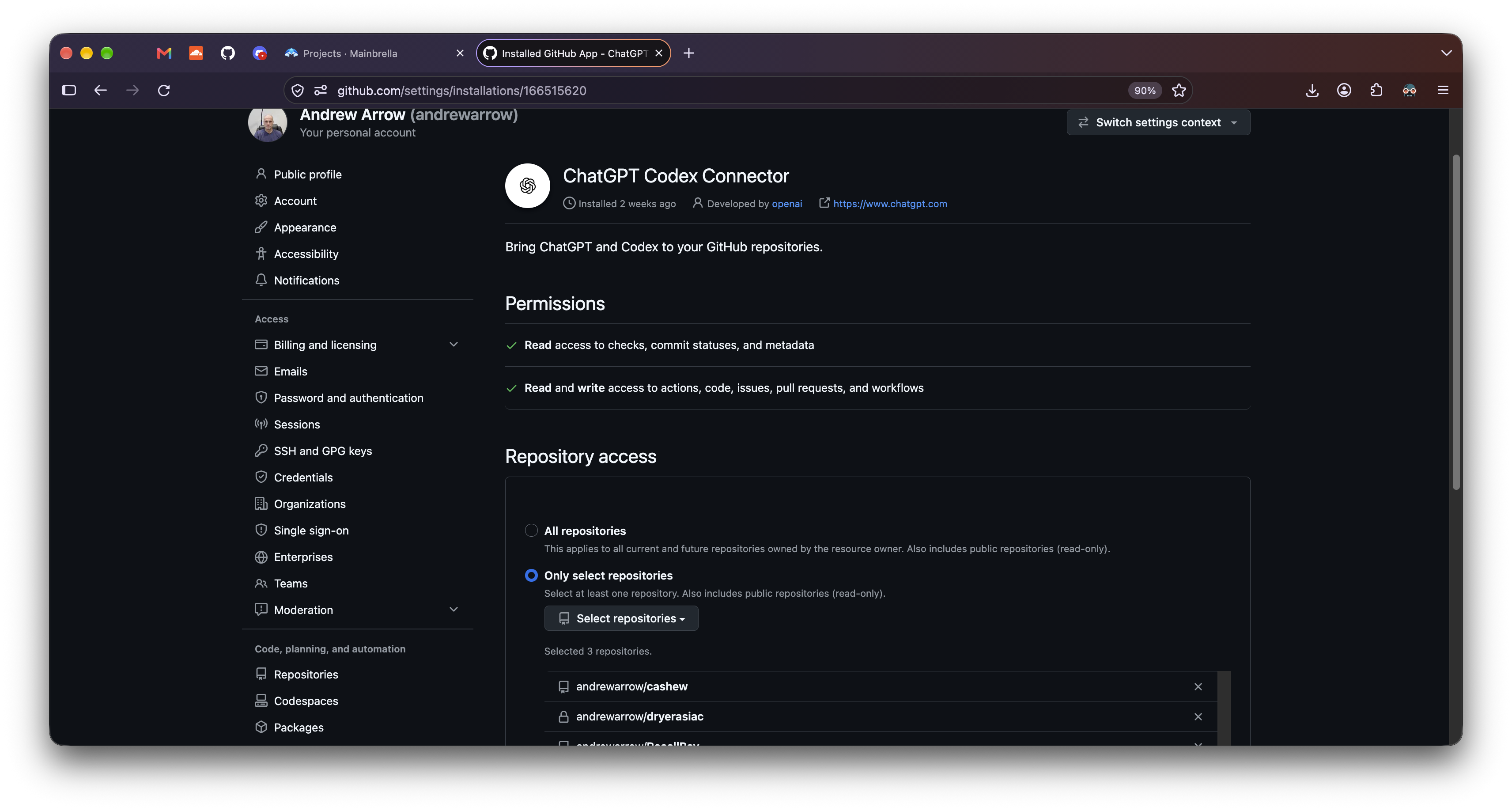
In the connector’s settings, I can grant access to All repositories or Only select repositories. This screenshot shows the second option, with a selector for adding repositories and a list of those already granted. GitHub handles these choices as part of its app installation flow, including the account and organization rules.
We gave our coding agent the first dialog and both connector screenshots and asked it to fix the flow. The revised Projects UI sends users to GitHub to install the app, choose an account, and grant repository access. When they return, they can pick a repository they have permission to write to. We fill in its default branch, which they can change. Manage repository access sends them back to GitHub to add another account or repository.
Choosing a repository we can write to
We copied the account and repository selection sequence, but Mainbrella asks for fewer permissions than the connector shown above. Our existing Import app only has read access. People who installed it didn’t agree to let us write to their repositories, so we made a separate Mainbrella Build app. Its registration manifest requests Contents write and Metadata read, with no workflow permissions.
Installing the app gives it access to selected repositories. The user also authorizes it to act on their behalf. We use GitHub App user access tokens, which are limited by both the app’s and the user’s permissions. Someone who can only read an organization’s repository shouldn’t gain write access by opening it in Builder.
Our repository picker lists repositories where the user can push and an active Build app installation has Contents write access. It leaves out archived and disabled repositories. Before linking, the backend checks the user’s permission again and checks the app’s write access through Git’s receive-pack service.
We keep the credentials in the API Worker, encrypted in D1 with AES-GCM. The build machine gets repository objects and a checkout, but no GitHub token. We don’t want generated application scripts holding a credential that could publish changes to the customer’s repository.
During local review, /github/build/repositories returned 503. Our backend was missing the Build app’s credentials, so the request stopped before it reached GitHub. The configuration endpoint confirmed this with {"enabled":false}. Build needs its own client ID, client secret, app slug, and encryption key; the setup instructions cover registration and the D1 migration. We’re still working through integration fixes.
Moving the commits to GitHub
The project keeps using our Git storage until the user confirms the repository and branch. If a build is active, we refuse the transfer until it finishes. We block new Builder turns while we move the history, so Builder can’t save another commit in the middle of the transfer.
If the project has saved Git history, the destination branch must be empty or already point to our saved commit. The Worker exports the bundle chain and sends its pack through Git’s HTTP receive-pack protocol. It checks the response, then reads the branch back to confirm the commit SHA. These are the original Git objects, so the commits keep their hashes and ancestry.
We include draft edits made since the last checkpoint in a subsequent commit. If the branch contains unrelated history, we stop and ask for a different destination. For a project with no saved history or source yet, we can import supported source from an existing GitHub branch or start in an empty repository. The migration code handles each case.
- Transfer the commits and check the branch on GitHub. The project keeps its hosted history until this succeeds.
- Record the GitHub repository in D1. Save the repository, branch, and commit, then clear the hosted heads and remove the old Git version rows in the same database batch.
- Delete the old R2 history. Remove the project’s
bundles/andparts/. A saved cleanup flag lets the scheduled job finish if deletion is interrupted.
There’s no transaction covering GitHub, D1, and R2 together. If the transfer fails, the project still has its hosted Git history. If R2 deletion fails after the switch, GitHub has the repository and we have some old objects left to clean up. On retry, we check whether GitHub already accepted the saved commit. If the transfer also created a draft commit, we check its project marker, parent, and snapshot before accepting it. The link handler records the switch after the transfer has been confirmed.
The next Builder commit goes to github.com
Once the expense tracker is on GitHub, you can still ask Builder to add monthly totals. Builder edits the files and runs its checks as before. The save function sees the linked repository and sends the commit to GitHub:
// saveBuildGitVersion selects the linked repository first.
const project = await githubProject(env, params.userId, params.appId);
if (project?.github_repo)
  return saveGithubVersion(env, params, runtime, turn, files, verified);
The Worker compares the saved files with the remote tree, uploads changed blobs, and creates a new tree and commit. It uses the old tree as the base, keeping unrelated repository files and deleting only paths Builder manages. We also keep an existing .gitignore so we don’t replace the user’s rules on every save. The branch update goes through GitHub’s reference API with force: false. If someone pushes before we finish, the update can fail instead of overwriting their commit.
GitHub can accept a commit before D1 records it. We include the Builder turn ID in the commit message so a retry can check the remote head’s message and parent and recognize that turn’s commit. If another writer has moved the head since then, we report a conflict.
You can also edit the app outside Builder. At the next turn, we read the linked branch and compare each supported source file’s last known GitHub version, working draft, and new remote version. We can combine edits to different files. If both sides changed the same file differently, we stop, report the path, and preserve the draft without changing the GitHub pointer. We compare whole files, so someone still has to resolve a conflict within a file. The importer supports at most 80 text files, each at most 64 KiB.
Browsing versions and restoring an earlier version also use GitHub, with commit SHAs as version IDs. We limit those reads to commits reachable from the linked branch. If access is revoked, branch protection blocks a write, or GitHub is unavailable, the operation stops. We don’t resume hosted Git storage behind the user’s back.
| After linking | What we use |
|---|---|
| Git history and new commits | GitHub. We stop writing hosted Git versions and delete the old R2 bundles and parts. |
| Working files, assets, conversation, records of Builder operations | Mainbrella storage. These still have storage costs. |
| Model inference and builds | Mainbrella’s model and compute services. These still have usage costs. |
If you clone the expense tracker’s GitHub repository and run git log, you should see the commits from before the move. Ask Builder to add monthly totals, pull the branch again, and its next commit should be there too.